Using Check my Location
Learn how Check my Location helps users on the road make better decisions, see useful nearby account information, and turn spare time into productive time.
Thought Process
We believe this has become one of the most useful tools in the system for people working on the road — accurate, simple, and built around the information users actually need while out and about.
Many systems show you where you are, but in reality you already know that, because you are standing there. The more important question is how that information helps in the middle of a real working day in the field.
That was the thinking behind Check my Location. Rather than simply showing a live location, the aim was to create a practical working tool which helps users make better use of their time, identify nearby opportunities, and act with confidence while on the move.
Why it matters
It helps users understand what useful accounts or opportunities are around them right now, rather than just showing a dot on a map.
Why it works
It combines location with practical account information so the user can decide quickly who to visit, call, or prioritise in the area.
What Check my Location Gives You
Live location with purpose
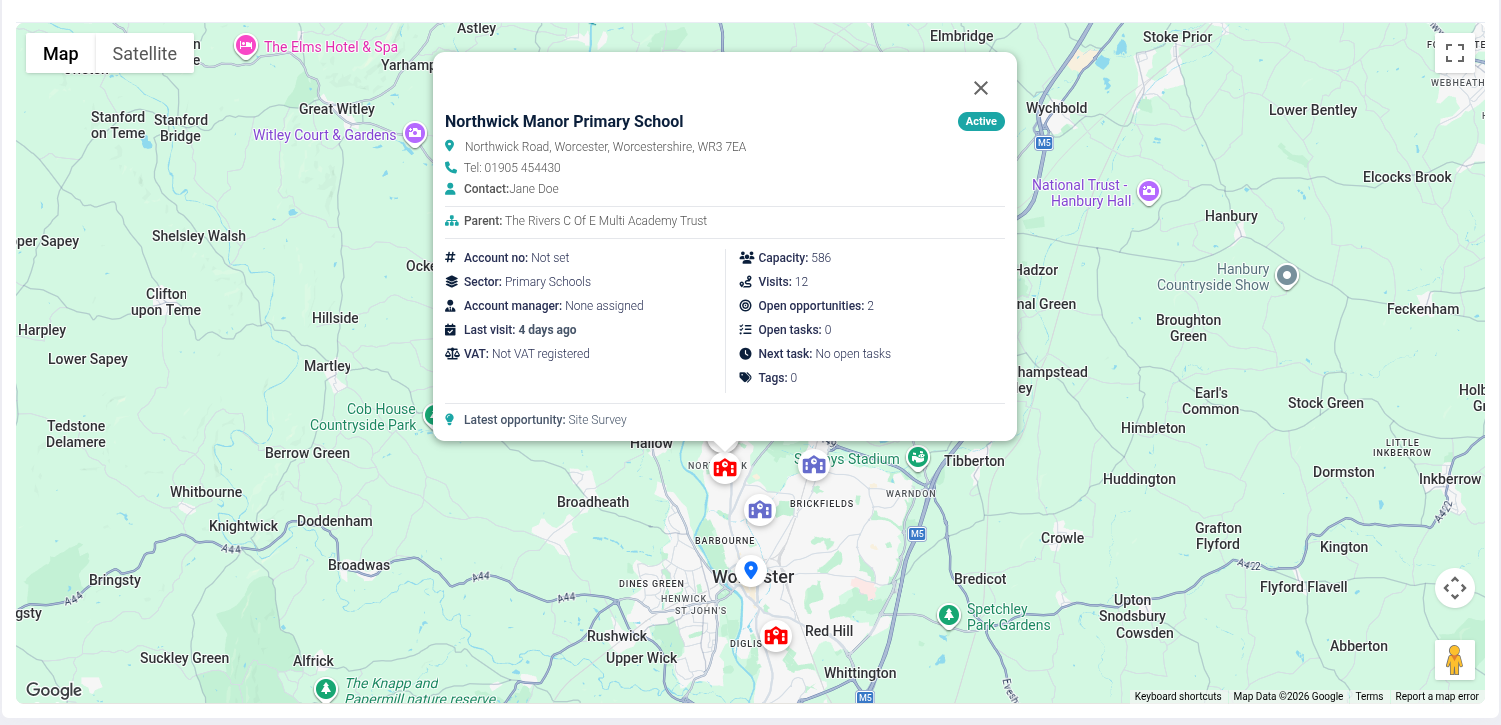
Live location is useful, but this feature goes further by adding a snapshot overview with the details that matter most to users on the road.
Nearby account visibility
It can show live or dormant accounts nearby, with the addition of extra local business information where available.
Useful account details at a glance
Information can include account name, address, telephone number, contact name, type of business, and whether the account is active or inactive.
Commercial context
Users may also be able to see helpful trading information such as current turnover versus last year’s turnover, making quick decisions easier.
Fill gaps in the day
If an appointment is cancelled at the last minute or finishes earlier than expected, the feature helps users use that spare time more effectively.
Make better use of the area
It gives users the confidence to work the local area more productively, with the right information already in front of them.
Simple Walkthrough
- Open the Check my Location feature while out on the road.
- Allow the system to pick up your live position if needed.
- Review the nearby accounts and businesses shown in the local area.
- Check the key information displayed for each result.
- Use the details to decide who is worth visiting, calling, or prioritising.
- Open the full account if you need deeper information before taking action.
Getting the Most From Check my Location
Use spare time wisely
If an appointment cancels or finishes early, check the area straight away and see whether there is another worthwhile visit nearby.
Think in terms of clusters
Instead of treating each account in isolation, use the feature to spot groups of nearby opportunities and plan your next hour more effectively.
Call before dropping in
If the tool gives you a nearby account with a telephone number, use it to decide whether a quick call first would make the visit more productive.
Use status to prioritise
Active, inactive, and dormant accounts may all have value, but checking the account status first can help you focus on the best option for that moment.
Arrive informed
A quick glance at the account name, business type, contact details, and recent performance can make the approach feel more prepared and professional.
Build it into your daily planning
This tool is not only for emergencies or last-minute gaps. It can also be part of regular road planning to help make every area work harder.
Check my Location Screen