Settings: Campaigns
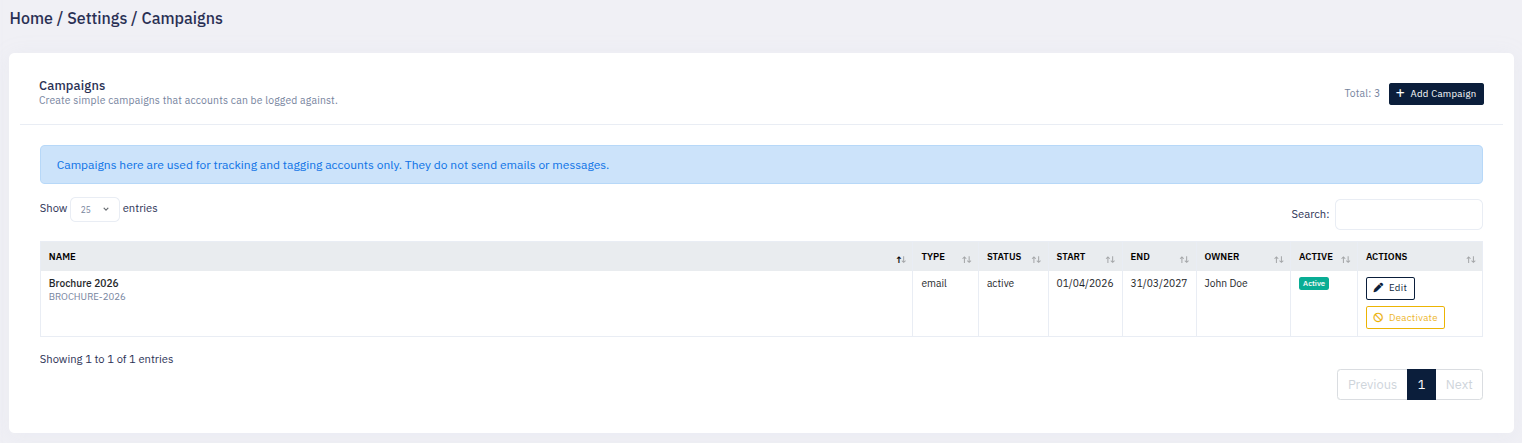
Learn how the Campaigns section lets your business create campaign options that can then be linked to accounts, making campaign tracking clearer and easier to review.
Thought Process
The Campaigns section is designed to give the CRM a simple and practical way to record that an account has been linked to a campaign.
Not every business needs a full campaign sending platform built directly into the CRM. In many cases, what matters most is being able to define campaign names clearly and then record which accounts have been part of them. This gives staff an easy way to keep campaign activity visible without overcomplicating the process.
Why it matters
Campaign tracking is much more useful when everyone in the business is working from the same campaign list and applying it consistently.
Why simplicity helps
A simple campaign logging system is easier to maintain and gives staff a clear way to mark campaign involvement on an account.
What This Section Does
Create campaign options
Add campaign names into the CRM so staff have a clear list of campaign options available when working with accounts.
Edit campaign entries
Campaign names can be reviewed and maintained over time so the list stays accurate and relevant.
Link campaigns to accounts
Once campaign options exist, an account can be added to one of those campaigns from the account editing area.
Keep campaign use consistent
Central campaign setup helps staff use the same naming and reduces the chance of duplicate or inconsistent campaign labels.
Review campaign history
Campaign activity linked to an account can then be reviewed later from the account page.
Improve visibility
Staff can quickly see whether an account has already been involved in a campaign and review that information in context.
Campaigns in Settings and Accounts
The Campaigns feature works in two main parts.
1. Create the campaign list
The settings area is used to create and manage the campaign options your organisation wants to use.
2. Apply campaigns to accounts
Staff can then choose one of those campaign options when working on an account, keeping campaign use structured and consistent.
Using Campaigns on the Account Page
Once campaigns have been created, staff can use them from the account area.
Campaigns tab in account editing
The edit account screen includes a Campaigns tab where a staff member can select a campaign for that account.
Campaigns shown in the account sidebar
Campaign entries can then be reviewed back on the account page as part of the wider account history and related information.
Created by information
Campaign history can help show who created the entry, which is useful when several staff members are working on the same account.
Date visibility
Campaign records are more useful when staff can see when the campaign entry was created against the account.
Simple Walkthrough
- Go to Settings.
- Open the Campaigns section.
- Add the campaign names your organisation wants to use.
- Save the campaign list so it becomes available to staff.
- Open an account and go to the Campaigns area when editing the account.
- Select the relevant campaign for that account.
- Save the account changes.
- Review campaign history later from the account page when needed.
Getting the Most From Campaigns
Use clear campaign names
Campaign names should be easy to understand so staff can quickly pick the correct one.
Avoid duplicates
Keeping campaign names tidy in Settings helps stop the same campaign being entered multiple different ways.
Review older campaigns
It is worth revisiting the campaign list from time to time so outdated or unused entries do not clutter the system.
Keep staff usage consistent
The value of campaign tracking improves when everyone uses the same campaign names in the same way.
Use it as an account history tool
Even without sending campaigns directly from the CRM, this still gives the business a useful record of campaign involvement by account.
Use it to support review work
Campaign history can help staff understand what attention an account has already had before making further contact.
Campaigns Screen Example