Using Visits
Learn how Visits help your team record outcomes, update account activity, create follow-up actions and keep everything linked clearly to the account.
Thought Process
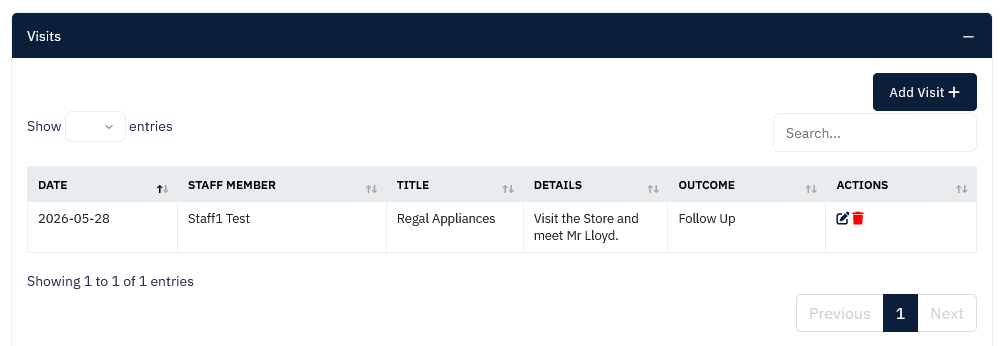
The Visits feature includes the usual headers you would expect, along with a selection of outcome results so each visit can be recorded in a meaningful way. Not every visit ends the same way, so the system allows the result to reflect what actually happened next.
Visit outcome options
- Won
- Lost
- Task
- Opportunity
- Reassign to a colleague or different department
This makes it easy to turn a visit into the correct next action without needing to leave the workflow.
Why use the internal system?
Reassigning and follow-up actions are handled within the CRM rather than through email. This keeps everything connected to the account, easier to review, and far less likely to get lost in a busy inbox.
Our Reasoning / Result
Not all visits end how you expect them to. Some are straightforward wins, others create opportunities, and sometimes a follow-up task is required. The Visits feature has been designed to reflect those real-world outcomes.
Not all companies work in the same way, but we believe we have covered the most common scenarios while still keeping the system flexible enough to support different approaches.
Everything Stays Around the Account
Emails can easily get lost in large inboxes. By keeping visit notes, follow-up actions and outcomes wrapped around the account, the information is easier to find and review in one place.
Clear Next Steps
Whether the visit leads to a win, an opportunity, a reminder or a reassignment, the result can be logged clearly so the next stage is visible and less likely to be overlooked.
If you create the visit while on the road, you can simply use the microphone on your phone to add visit notes straight away. This helps reduce the need for late-evening admin and keeps the record updated while the details are fresh.
What This Helps You Achieve
- Record the outcome of each visit in a practical way.
- Turn visits into follow-up tasks, opportunities or reassigned actions.
- Keep visit notes linked clearly to the relevant account.
- Reduce reliance on emails for internal follow-up.
- Make end-of-day checking easier so nothing is left behind.
Getting the Most From Visits
Use the Quick Overview
Take a glance at the three-line summary or the bell icon at the top of the page for a quick overview of the connections and contact made with that particular account.
Review Visits in More Than One Place
Visit notes are listed in the accordion on the account page, but they can also be reviewed and edited through the left-hand column under Visits, where they can be divided again by the different outcome results.
Use Voice Notes on the Road
If you are logging a visit while out and about, use your phone's microphone to add the notes there and then. It is a fast way to capture the details without leaving the admin until later.
Check Everything at End of Day
Use the visit records as part of your end-of-day review to make sure stages are up to date and no opportunity, task or follow-up has been accidentally missed.